 By Matt
• Music Production Gear
• Published 25 June 2025 • Updated 17 July 2026
By Matt
• Music Production Gear
• Published 25 June 2025 • Updated 17 July 2026
A Simple Studio Monitor Stand Buying Guide
Before you start reading, just letting you know that my site contains affiliate links, at no extra cost to you, but they may give me a small commission to help run the site. Feel free to get extra info on my disclaimers page. Thanks and on with the show...
Why Studio Monitor Stands Matter More Than You Think!
Want to make sure that you start off in the best possible position before you start to mix and produce music - don't forget about Studio Monitor Stands!
These products are about more then having a tidy studio set up - they help you hear the best version of your music and give you a leg up for mixing - not to mention they help you to not knock over those expensive monitors.
Lets dive into to the post where I take a look at why we need them and how best use them - as well as some buying options that I have looked at.
Do I Really Need Studio Monitor Stands?
Well, the short answer is YES! If you are serious about getting your music sounding as good as it can be, want to mix music in a similar environment and set up as the professionals and as mentioned, don't want to ruin those expensive monitors you just bought - investing in some relatively inexpensive monitor stand is a must.
Monitor stands are used to lift your speakers up to the right height and to isolate them from interfering with the desk or other furniture. Without them, the sound can interfere with the environment around you instead of going directly to your ears causing distortions like bass build up and muddy mids that you might try and fix when you don't have to.
The Studio Monitor Stands help you to hear a more clear and, weird term, "honest" sound which enables you to make better decisions when finalising the songs that you are producing.
What Makes a Good Monitor Stand in the Studio?
Monitor stands are not about spending a tonne of money but just making sure that all the features are there. Here are a few points to consider when looking at purchasing them:
Ear Level Height
Making sure that the monitor stands can be adjusted so that they can line up with your, or others in your studios, ears.
Stability
A good stand needs to not wobble or tip over if it gets bumped.
Weight Support
They need to be able to support the weight of the speaker if is holding.
Vibrations
It needs to have some sort of material to stop vibrations which in turn will help keep the sound "clean".
Size
Make sure you know the space you are dealing with before purchasing to make sure they fit and have enough room to be adjusted.
How to Aim Your Monitors for the Best Sound
Once you have your studio Monitors on their stands, it is very important to get both the height and angle correct if order to maximise their impact.
So, why does the angle and the height seem to matter so much?
- Sound travels basically in a straight line from your monitors tweeters ( these are the small part of the speaker that handles the high frequencies).
- If the monitors are too high or low, the sound will miss your ears and you will miss all that detail in your creation.
- You want those tweeters aimed directly at your ears. It should be an equal triangle between your ears and the monitors.
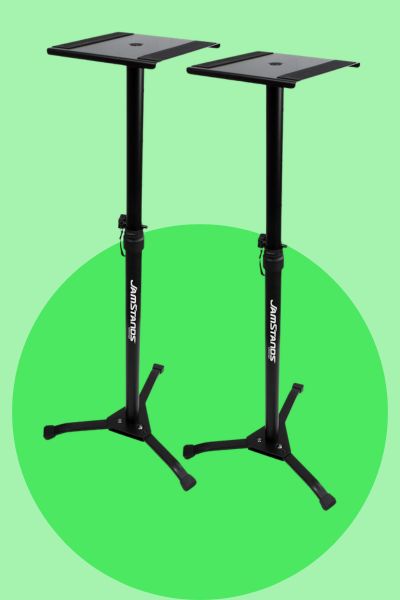
SMS6000 Adjustable Monitor Stands
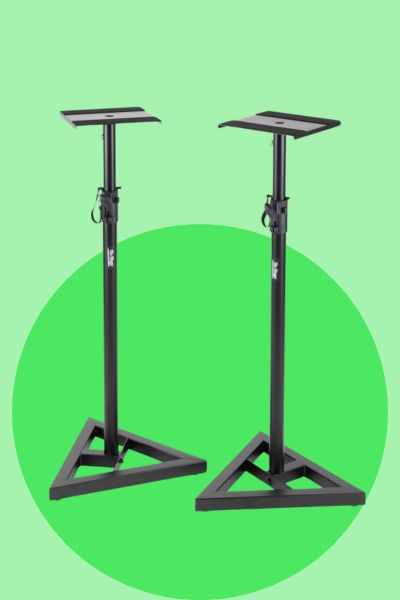
The SMS6000 Adjustable Monitor Stands are the flexible option in this comparison.
- Height adjustable from 36 to 54 inches
- Tripod base adds stability and folds for storage
- Rubber feet and interchangeable carpet spikes
- Holds up to 90 lbs
Why Is It Great?
They offer reliable performance and adjustability without costing a fortune. These are a good option if you need proper height adjustment and want something that can work in different studio spaces.
The Pros & Cons of SMS6000 Adjustable Monitor Stands
Pros
- Good height adjustment
- Stable tripod base
- Folds for storage
- Strong weight support
Cons
- Takes up floor space
- Tripod style may not suit every room
- Not as compact as desktop stands
Gator Frameworks Studio Monitor Stands - For Desktop
The Gator Frameworks Desktop Monitor Stands are the compact choice for people working on a smaller desk.
- Designed for desktop use
- Compact footprint for smaller spaces
- Built-in rubber pads help isolate monitors
- Steel construction supports up to 60 lbs
Why Is It Great?
They’re a solid choice for producers working in limited space without compromising stability. If you do not have room for floor stands, these make more sense.
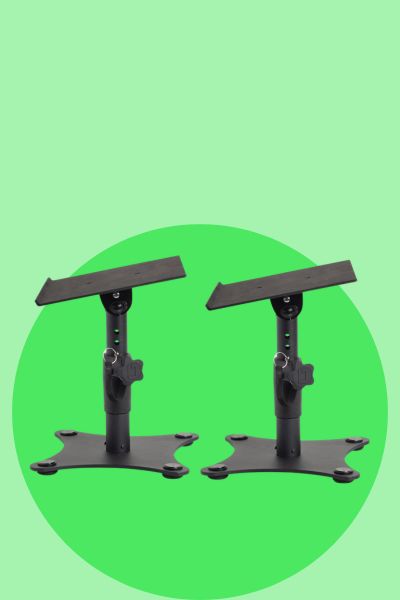
The Pros & Cons of Gator Frameworks Studio Monitor Stands - For Desktop
Pros
- Compact desktop design
- Good for smaller rooms
- Rubber pads for isolation
- Solid steel construction
Cons
- Only works on a desk or surface
- Lower height range than floor stands
- Not ideal if your desk is already crowded
Ultimate Support JSMS70 Studio Monitor Stands
The Ultimate Support JSMS70 Studio Monitor Stands are the more polished studio option in this comparison.
- Wide, low-profile base for stability
- Adjustable height from 32.5 inches to 44.25 inches
- Foam-padded platform helps reduce vibration
- Sleek black finish for a clean studio look
Why Is It Great?
These stands look professional and help deliver the clear sound I need when mixing. The foam-padded platform is a useful feature if you are trying to cut down vibration and get a cleaner listening position.
The Pros & Cons of Ultimate Support JSMS70 Studio Monitor Stands
Pros
- Stable low-profile base
- Foam-padded platform
- Adjustable height
- Professional look
Cons
- Lower weight support than the SMS6000
- Still needs floor space
- More expensive than basic options
FAQ
Do I really need studio monitor stands?
If you want a better listening position and cleaner monitoring setup, studio monitor stands are worth considering. They help lift the speakers to the right height and can reduce desk vibration.
Should studio monitors be at ear level?
Yes, the tweeters should generally be aimed at ear level so the sound reaches your listening position properly.
Are desktop monitor stands better than floor stands?
Not always. Desktop stands are better for smaller spaces, while floor stands are better if you want more placement flexibility and do not want the monitors sitting on your desk.
Which studio monitor stand is best for small desks?
The Gator Frameworks desktop stands are the best fit from this comparison if you are working with a smaller desk or limited space.
Which studio monitor stand is best for flexible height adjustment?
The SMS6000 Adjustable Monitor Stands are the best fit here if you want more height adjustment and a taller floor-standing setup.
In Summary - Monitor Stands To Hold Up Your Sound
If you want to get the best sound for mixing and playback for the music you're creating, don't put those monitors on a desk or floor, put them up on a dedicated studio monitor stand.
Studio Monitor Stands matter.
They might not be the most expensive tool in your arsenal but they are a tool that leads to improvement in the music you are creating. We all know that some things create a huge amount of difference and are life changing and lets be real - these are not it - BUT if your goal is to make subtle yet important changes that when combined, do add up to a big change, I couldn't recommend a set of studio monitor stands enough.
Just to recap on my picks:
- On-Stage SMS6000 – Great for flexibility and tall setups.
- Gator Frameworks Desktop – Compact and clean for small desks and limited space.
- Ultimate Support JSMS70 – Sturdy with the foam padding and easy to adjust.
ABOUT THE AUTHOR